
Searching Cases by Name
Pick the court before anything else. The Reeves County District Clerk holds felony, district civil, family, divorce, and delinquent-tax files. Other district matters sit there too. County-level civil, probate, guardianship, and misdemeanor records stay with the Reeves County Clerk. Justice of the Peace clerks and Pecos Municipal Court keep their own lower-court dockets.
- Copy the full name, party role, likely filing year, and court from the notice or other case paper.
- Open re:SearchTX, select Cases, and choose a party-name Search By option if available.
- Enter the last and first names. The official guide permits an asterisk wildcard in supported party-name fields.
- Use Advanced county, court, or case filters when offered, then run Search.
- Compare likely matches by case type, filing date, court, and party role before opening Case Details.
- If no sound match appears, contact the Reeves County clerk that keeps the file.
Two people can share one name. Tie any Reeves County case search to a known court matter, a date, or a cause number before trusting the match.
Three Reeves County Case Searches
County, state, and clerk-office routes overlap. None of them replaces the others. The Reeves County Clerk page calls its linked GovOS tool "Official Online Search of All Court Records." Its landing screen does not spell out which case types are fully covered. So confirm the scope before trusting a blank result. The official county-linked search screen shows the interface you may meet.
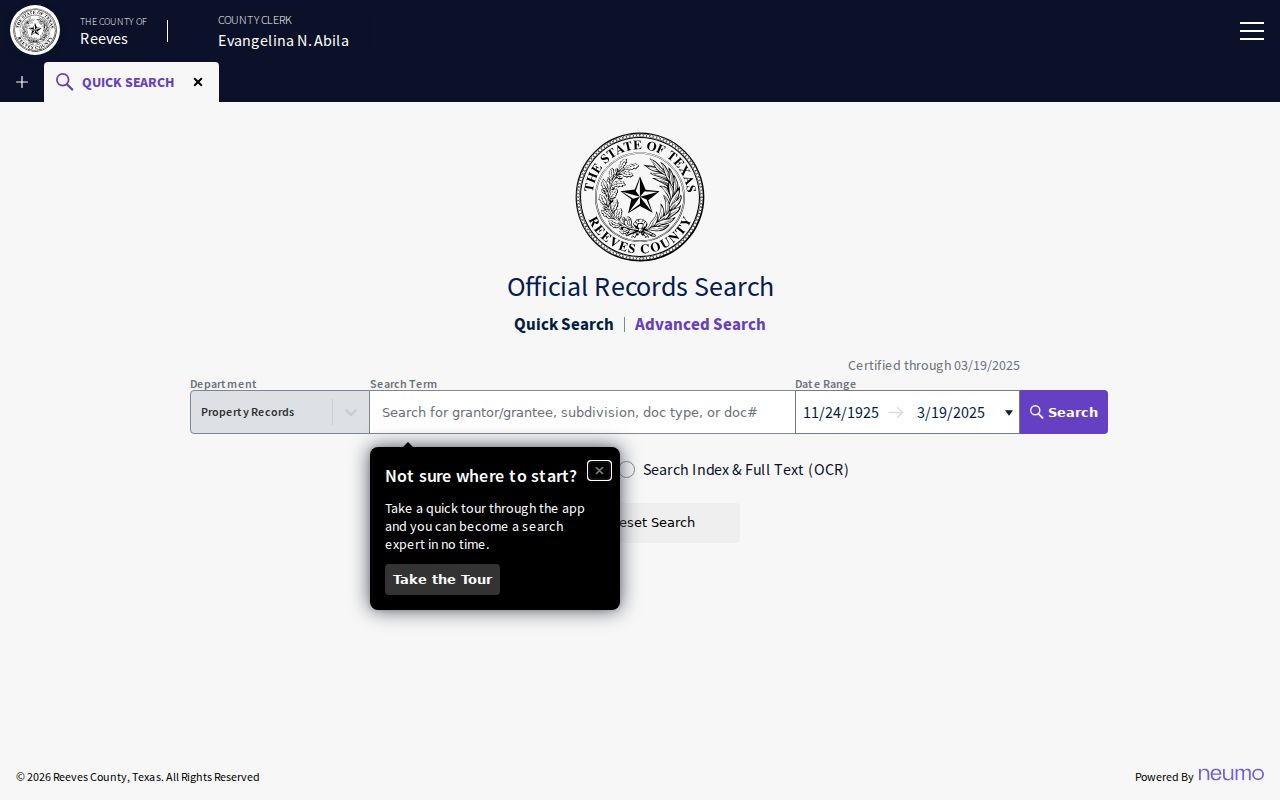
That screen is why the label alone proves little about whether one database holds every District Clerk, County Clerk, JP, and municipal docket. For 143rd District Court records, the District Clerk offers phone and email search channels rather than a separate local case portal.
Searching by Case Number
A cause number is the court's unique file key. It usually beats a common-name search. Type it exactly as printed, keeping the punctuation when the system accepts it. Reeves County has not published one official cause-number pattern covering every court. So never guess at a year or a case-type code. Use the real number, written as EXACT CAUSE NUMBER. Pair it with the court that issued it. A number from Pecos Municipal Court may not work in a Reeves County District Clerk channel. Clerks sometimes report a transfer, an appeal, a consolidation, or a companion case. When that happens, ask for the new court and number. Then run the docket search again.
Reeves County Case Search Controls
The re:SearchTX guide lays out the main case-search controls. Dialog fields shift with the chosen search method, so read each label before typing.
| Field or control | Type | Use | Notes |
|---|---|---|---|
| Cases | Tab | Select case mode | Separate from Hearings |
| Search By | Dropdown | Choose the query method | Required after mode selection |
| Search text | Text or dialog | Enter a name or number | Fields vary by method |
| Advanced | Button | Open more filters | Use Reeves County or court when offered |
| Sort By | Dropdown | Order results | Newest, oldest, or case number |
| Reset / Export | Actions | Clear or save results | Export does not prove completeness |
Open a case description and Case Details appears. An Add control can drop a document into a cart, though the index and a purchased filing image are two different levels of access.
What a Case Search Returns
Each result row helps identify the matter. Case Details can then list parties, court actors, filings, documents, and hearings where that data exists.
| Case Number | The court's cause number used to locate and request the file. |
|---|---|
| Style / Parties | The caption and listed roles, such as plaintiff, defendant, petitioner, or respondent. |
| Case Type | The category supplied by the court, such as civil, criminal, family, or probate. |
| Filed Date | The date the case or filing entered the clerk's system. |
| Status | An open, closed, disposed, or other court-supplied state. |
| Events | Dated filings, notices, orders, hearings, resets, pleas, or judgments when exposed. |
A result is an index, not always the whole file. Check the event date and description before reading an entry as an order or an outcome.
A Blank Reeves County Case Search
A blank Reeves County case search can mean a wrong venue, an older or non-integrated file, a spelling mismatch, or a restricted case. It never proves the case does not exist. Try the exact number again, put an asterisk in a supported name field, loosen a tight date filter, and check the court named on the source paper.
- District file: call 432-287-0222, option 6, or email DistrictClerk@reevescounty.org.
- County-held file: call 432-287-0222, option 3, or visit the County Clerk in Suite 101.
- JP case: call the correct precinct office rather than either county courthouse clerk.
- Pecos citation: use the municipal citation search or call 432-445-2417.
- Older document: send a written request with the case number, title or date, copy type, payment, and return address.
Phone and email reach the Reeves County District Clerk for record and copy questions. Filings themselves cannot arrive by fax or email.
Statewide vs County Case Search
When the court is unclear, use both official layers. Each does a different job, and neither stands in for the actual custodian.
| Point | re:SearchTX | Reeves County route |
|---|---|---|
| Coverage | Participating electronic court records statewide | County-linked portal and separate clerk offices |
| Best use | Cases or hearings that may span Texas courts | A known Reeves County court or file |
| Detail | Case Details, filings, documents, and hearings when available | Local docket, paper file, copies, and certification |
| Fallback | Free account and current portal help | Phone, email, counter, or mail to the custodian |
A Judicial Council report describes electronic records back to 2016 in the statewide layer and flags limits in its cited criminal inventory. That history matters. It is reason enough to call the Reeves County clerk about an older or missing case.
Reeves County Case Search and E-Filing
eFileTexas handles the submission of filings. It does not handle public docket browsing. Texas makes attorneys e-file in district and county civil, family, probate, and criminal cases. Non-attorneys are encouraged but not required. Filing History tracks one filer's own submissions. Treat it as no substitute for a full Reeves County case search.
Portal distinction: eFileTexas sends filings; re:SearchTX displays participating public case information; the Reeves County clerks maintain the court files.
A service-only filing may not show up statewide. The official guide says the clerk or the filing party may need to supply a copy.
Access and Restricted Cases
Public metadata can include a number and case type. It may also list filing date, parties, court, judge, status, and hearings. Filed images may still demand an account, a purchase, or a clerk request. A certified copy comes only from the clerk, never from a screen capture. Adoptions are closed to the public under the Reeves County District Clerk's stated practice. Juvenile, sealed, expunged, and other confidential matters may show a limited shell or a restricted marker. Some show redacted data. Some show no public result at all. Texas Rule of Civil Procedure 76a governs sealing of civil court records. A clerk can confirm a restriction without releasing protected content. Never try to work around one. A party, counsel, or another authorized person should ask the clerk what is needed. That request, proof, or court order opens the door.
Reeves County Case Search Requests
The Reeves County portal may give you only an index entry. It may give nothing at all for an older filing. In that case, go straight to a written request. Spell out the court, the cause number, and the case style. Add the document title and its date. Say whether you want a plain copy or a certified one. Add your contact details, payment, and a return address. A quick call to the clerk confirms the fee and what payment forms are accepted.
Fees differ by office. The Reeves County District Clerk charges $5 for a civil or criminal name search. Written or emailed copies run $1 per page. Certification adds $5 more. The County Clerk lists a $10 criminal search, $1 per page copies, and $5 certification. Paying these fees buys the clerk's search and copies. It is not a guarantee that every request can be filled. Nor does it promise that every protected document gets released.
Mail a 143rd District Court request to the Reeves County District Clerk, P.O. Box 848, Pecos, TX 79772. County Clerk files go to P.O. Box 867, Pecos, TX 79772. A precise request saves time. It also leaves a clear record. It shows exactly what you asked the Reeves County clerk to pull from the court docket.
Reeves County Case Search Wildcards
Names get spelled more than one way. When that happens, or when the full first name is unknown, a wildcard helps. The re:SearchTX guide allows an asterisk in supported party, attorney, and judge fields. Begin broad, then narrow the results by Reeves County, court, filing date, or role.
No wildcard fixes a venue problem. The case may sit in a JP precinct. It may sit in Pecos Municipal Court. Either way, use that court's own channel for the docket search rather than repeating a statewide query.
Reeves County Case Search Depth
You do not have to buy a filing to learn something. The Case Details index can show the court, the parties, the case type and status, event names, and hearing data the participating court supplied. Read those fields first. Write down the exact document description and date.
Save the Add and cart path for when you truly need the page image. A clerk-certified copy is a separate product altogether.
Reeves County Citation Case Search
Pecos Municipal Court runs its own citation search for city Class C and ordinance matters. That tool is not the Reeves County District Clerk search. Match the issuing court printed on the citation. Then use the search fields its portal offers.
Justice-court tickets stay with the right JP precinct. The county JP page posts no common online search form. Calling the precinct clerk is the fallback for a docket lookup there.